You’ve seen the posts.
Someone updates their LinkedIn status.
They toggle on the “Open to Work” badge.
They write a short post about being on the job market.
It gets a few likes. A couple of “good luck!” comments.
And then… silence.
Weeks go by. Still no traction. No interviews. No offers.
It’s not that these folks aren’t great candidates. Or that there’s anything inherently “wrong” with using “Open To Work.”
The REAL problem: Relying on a passive signal to do an active job search.
Toggling on the green badge or posting “I’m looking” is easy. 2 clicks and everyone on LinkedIn sees it.
But that’s exactly why it’s so easy to ignore.
You’re broadcasting to everyone. And therefore, not asking anyone.
Let’s fix that.
Here’s what you’ll learn today:
-
How to reach 10x more people and start conversations faster (without sounding like a bot)
-
Simple automation tricks that make your job search more personal, not less
-
The exact scripts and tools I use to help my clients land interviews in weeks, not months
…and more!
🪧 You Should 100% Let People Know You’re Looking
No one’s a mind reader. Not even your closest friends.
If you need help, tell people.
Whether you are looking for:
-
A new job
-
New clients
-
Tips on what air fryer to buy
It’s your job to “wave the flag.”
But the people most likely to help?
They’re already in your network.
The question is: how do you reach them?
Here’s the challenge: The more personal your outreach, the fewer people you can reach.
If you send highly personalized, one-on-one messages to 20-30 people, you’ll get responses…
But sending one-off personalized messages takes TIME.
Let me give a quick example:
My friend Simone needed funding for her film, so she sent personalized messages to her network.

She started each message with a custom introduction that referenced her relationship with that person, followed by a standard template that explained her project.
This approach worked. She crushed her fundraising goal. But not everyone has that kind of time.
Now, the flip side:
Mass-messaging hundreds of people might seem efficient, but it comes at a cost. The more generic your message, the less likely people are to respond.
Think about it: Would you take action on a message that feels like it was copied and pasted to hundreds of others?
I wouldn’t.
Here’s a real (redacted) example someone in my network sent me:
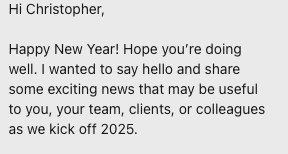
(This is from someone I sang Dashboard Confessional songs in a NYC shots bar. If that’s our relationship status… you can call me Chris 🙂
This mass-messaging approach covered a lot more ground…
But I doubt it was effective.
So what’s a better approach?
Get the best of both worlds.
-
Send personalized targeted messages
-
Do it at scale (dozens at a time, NOT 1:1)
A few years ago, you couldn’t do this without an ESP (that’s jargon for “email service provider”: think software tools like beehiiv, Kit, Mailchimp, etc.)
But now it’s getting easier and easier.
Here are three strategies to 10x your outreach with automation and AI, while keeping a personalized touch
1/ Reach Out Manually And Use A Text Expander (High Trust, Low Scale)
This is the old-fashioned way, but with a little help from some cheap tech:
You’re still going to DM or email them directly.
The main change is to make this more efficient and consistent by using a Text Expander tool instead of copying & pasting messages.
I use atext, but you can use whatever you like.
(Also: a big problem with copying & pasting is that it can retain formatting, so people know if you’re mass emailing.)
Here’s a simple script you can use:
Subject:
Hey [Name] —
How are you and [family members]? What’s new with [thing they’ve been working on]? I’m currently looking for a remote [role type] role focused on [industry or problem space]. Ideally with a company that [short description of the type of company].
If you know of any teams hiring—or if you know someone I should talk to—I’d really appreciate it. Even a quick forward of my resume would mean a lot.
Hope you’re doing well,
[Your Name]
Plug that script into your text expander, then use your shortcuts to expand it.
Then you just need to personalize the introduction.
Here’s what it looks like in practice.

This allows you to keep total control over each message.
It doesn’t scale well, but it’s going to work: you’re going to get read.
And you’re going to get on people’s radars.
Strategy 2/ Use Gmail Mail Merge (Med Trust, Med Scale)
I really like this strategy.
It strikes a great balance: you can personalize each message while reaching many people at once.
While there is some initial setup with Google Sheets and merge fields, it’s straightforward once you get started.
How this works:
-
Set up this Google Sheet template with names and emails.
-
Create an email draft in Gmail using tags like [First name], [Company], etc.
-
Use a Google Mail merge script to send customized emails to everyone in your sheet
See this documentation for the full setup details on this method.
Each person gets a personalized note with their name, role, and relevant info.
You stay human, but now you can send 50, 100, or more messages per day.
For example, I start my IRL conversations by asking about people’s families. So that’s how I start these emails.

Now, what I really like about this method:
Even if someone knows you’re doing this…
It’s still personalized.
You can’t fake it. You have to know about the person and ask relevant questions.
Here’s their reply:

Again, Gmail Mail Merge is the best of both worlds. You can have quality AND quantity.
Strategy 3/ Use Clay + AI for Personalization at Scale (Med-Low Trust, High Scale)
This is the power move if you want to go all the way with automation.
I talked about using Clay before.
Clay is an AI-powered go-to-market outbound tool used by some of the world’s hottest tech companies (think: OpenAI).
But you can start using it for free as a full-time AI-powered job search assistant.
Here’s how you can use Clay to send dozens or even hundreds of personalized messages at a time.
-
Import your contacts from Gmail, LinkedIn, or Twitter into Clay.
-
Enrich their profiles with data from LinkedIn, Twitter, or even company bios.
-
Use AI (e.g. ChatGPT, Gemini, Claude, whatever LLM you want to use, all inside Clay) to summarize your relationship, recent posts, and shared interests.
-
Generate messages that still sound human, but take seconds to create.
-
Send directly through Clay, or export to a Google sheet and use the Gmail Mail Merge strategy mentioned above.
You’re gaining A LOT of speed and scale with this approach.
But remember that it comes with a tradeoff!
Because you’re relying on AI now, you should either:
-
Test and iterate on your prompting so you create great messages
-
Double-check all messages before you send them out
💫 The Bottom Line
This is how I teach my clients to scale outreach without sounding like a robot (or worse, a lazy copy & paster).
So, which strategy should YOU use?
There’s no “best” strategy—just the one that fits where you are right now.
Here’s how I think about it:
-
If you’re just starting out → try a text expander and get comfortable with emailing a lot of people.
-
Once you know what you’re saying → move to Gmail Mail Merge.
-
When you’re ready to go faster → test Clay + AI, and make time to experiment.
At the end of the day, this isn’t about just telling people that you’re “open to work.” It’s about starting conversations.
The green badge is fine. But it’s passive. It requires too much luck.
You’re not looking for luck—you’re looking for leverage.
Use any of these three strategies to go direct. Be specific.
People want to help!
So make it easy for them.